BCv2
The Negotiator II
My second PCB business card, and a USB PD power supply you can carry anywhere.
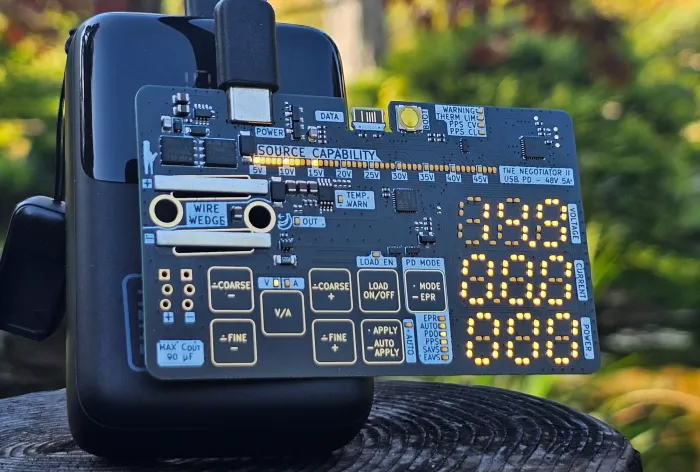
About The Negotiator II USB PD 3.1: Unlocked. What it does and how I made it.
- USB PD 3.1
- 5 to 48V in 0.1V steps
- Up to 5A
- 2 mm thick
- About 200 LEDs
- $8 a board
The Negotiator II is here! USB PD 3.1: Unlocked.
USB PD (Power Delivery) is a miracle, behind which is a lot of complexity. USB Chargers today have chips much more powerful than the Apollo 11 moon landing guidance computer, so we cant just grab a charger and get 15V out of it, all that capability is locked away, and the Negotiator is the key.
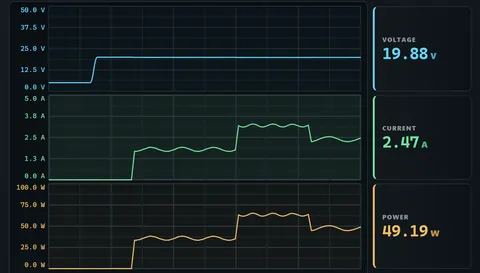
With the Negotiator II, you can find out exactly what any USB port can do with the capability bar and mode selector. Then, select whatever voltage your charger supports between 5 to 48V in 0.1V increments and you’ll get that. Selecting a voltage will show you what current your charger can provide at that voltage, this card can deliver up to 5A! Apply your selection to initiate the negotiation and you’ll see a live measurement of the voltage, current, and power at the card’s input.
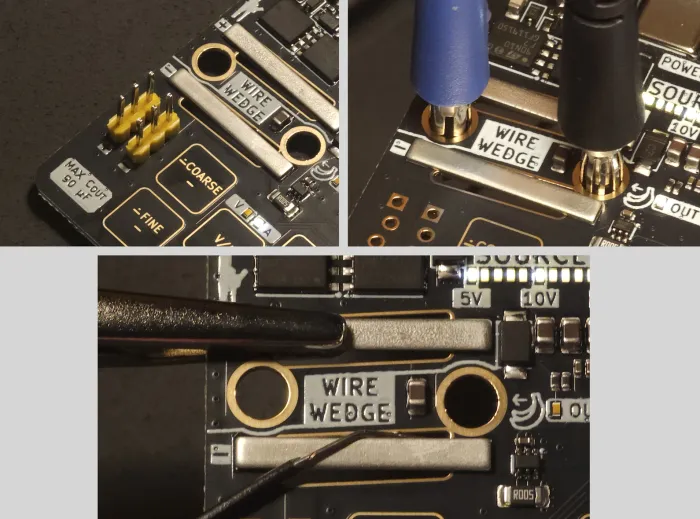
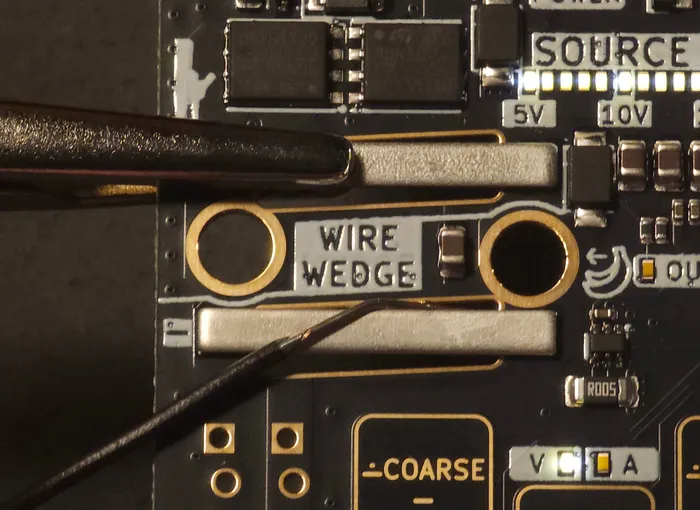
Use it to power your load from any USB C charger/powerbank when out on the field. Connect your load using one of the various connector-less solutions shown in the photo below. Im pretty proud of the wire wedge! Its a low profile, quick, and cheap wire-to-board connector. Wedge the wire in, pull it parallel to the board as shown, done! Otherwise, use banana plug, a crocodile clip, or friction fit 0.1” header. At 2 mm thick including the PCB and components, It’s small enough to go into your bag or wallet so you always have a power supply handy.
This was a challenging and rewarding board to design. I managed to get the cost down to $8 per board delivered for a quantity of 100. When you consider all the capabilities, 0.8mm 4-layer ENIG plated PCB, the sheer number of components (including about 200 LEDs!), I think it’s certainly an achievement to be proud of.
Powering around 200 LEDs from 48V was fun, especially trying to do it as cheaply as possible and with components under 1.2 mm thick. I could not afford to use a buck regulator or expensive ultra efficient LEDs. These 0402 LEDs produce 10 mcd (bright enough for outdoors) with less than 0.2 mA and cost $0.004 each. The LDO works well with firmware throttling, feeling warm and not uncomfortable to touch.
With the VBUS and CC pins next to each other, a VBUS to CC short at 48V is a real and dangerous possibility. TI’s TPD4S480 is the right chip for the job, However, It costs $1.1 @1k qty. Instead I used depletion mode N-channel mosfets which deplete, cutting off CC and protecting the MCU. I tested shorting 48V to CC input – no current or heat, and negotiation worked afterwards.
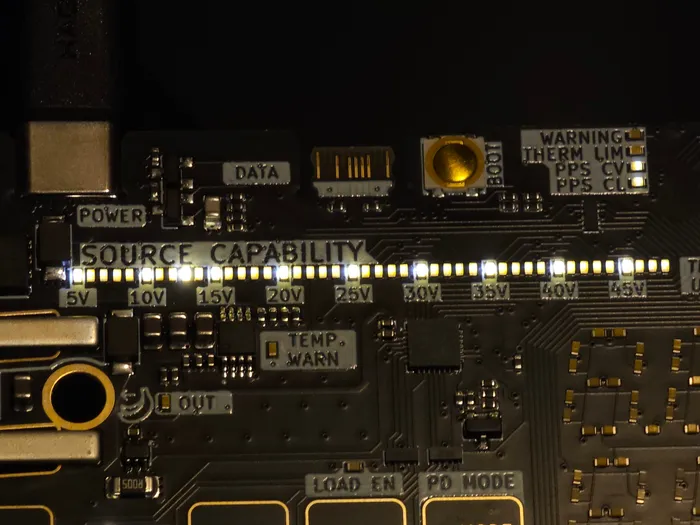
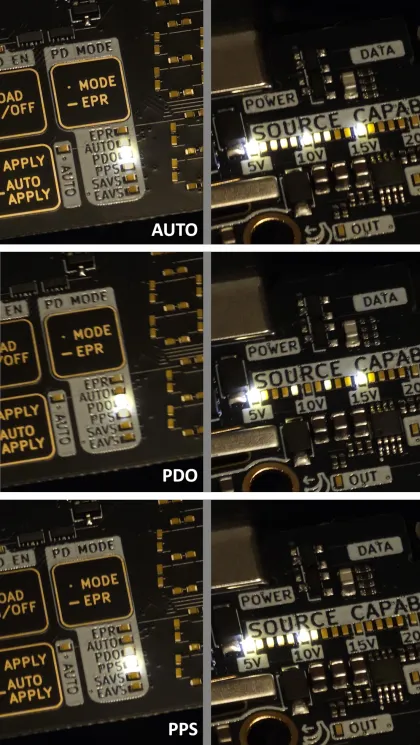
This card shows the USB PD modes, in the photo below, you can see the different modes that this card supports. Auto combines all modes and selects the highest current available at every voltage. PDO cannot do 9.2V, you’ll need PPS or AVS for that. Multiple modes can support the same voltage at different current limits.
To make this card a reality, I had to write a library for it. I plan on open sourcing the PD version of that and releasing the cheapest PD 3.1 Sink design, ever. So check back here soon!
Instructions Got one of my cards? Heres how to use it.
So you got one of my business cards, awesome! Its also a tiny USB PD power supply, here's how to use it.
Want to see everything its doing? Plug it into your computer and open the console.
This page is a work in progress, so check back again soon!
What can it do?
See what your charger offers
Plug it into a USB-C charger and the SOURCE CAPABILITY bar lights up every voltage it can give you, from 5 to 48V. The mode lights show which PD modes it supports (PDO, PPS, SAVS and EAVS), the one its using is brighter. In a few seconds you know if that charger is any good.
Power your projects
Pick a voltage, press APPLY and the card negotiates it with the charger. Then press LOAD ON/OFF to send it to your load. A very slim and portable power supply, all you need is a PD charger and a cable!
How to use it
Plug it in
Plug a USB PD charger into the POWER port. The displays show the voltage, current and power going out, and the bar shows what the charger offers.
Hook up your load
Use the WIRE WEDGE, banana plugs, or the 0.1" headers. Wedge the wire in like below, or just clip a crocodile clip on it. Keep your load's capacitance under 90uF, its printed on the card too.
Change the voltage or current
Press V/A to choose voltage or current, then FINE + and FINE − for small steps or COARSE + and COARSE − for big ones. The new value blinks until you press APPLY.
Dont want to press APPLY every time? hold it for AUTO APPLY, now every change goes through right away. Hold it again to turn it off.
Pick a mode
MODE picks between AUTO, PDO, PPS, SAVS and EAVS. Tap it and the one you're on blinks, tap again to move to the next one, then press APPLY (or just wait 5 seconds). AUTO stays lit dimly while its on.
If the new mode cant do your voltage, the card goes to the next one down. If it has nothing lower, it goes up to the lowest one it has: your old voltage flashes fast as a warning, and the load turns off before it changes. Want to go up with the load still on? Pick the higher voltage in AUTO.
Hold MODE to turn EPR on or off, that's where 28V and up live.
Turn the output on
LOAD ON/OFF turns your output on and off, and LOAD EN lights up when its on. If LOAD EN blinks, the output cant turn on yet, or the change you're making will turn it off when you apply it.
Lock the buttons
Hold V/A for a second so nothing changes accidentally, and hold it again to unlock. LOAD ON/OFF still works while its locked.
What the lights mean
THERM LIM means the card is dimming its display to keep its regulator happy, which happens at higher voltages. Nothing is wrong.
PPS CV and PPS CL glow dimly whenever you're on PPS. The bright one shows if the charger is holding your voltage (CV) or limiting your current (CL).
If WARNING blinks, its spelling a letter in Morse code:
- Rthe charger said no, or it said yes but never gave the voltage (the card tries a few times first).
- Syour settings couldnt be saved.
- Tthe power dropped out.
- Fthe card lost power a few times while restoring your last setting, so it started with a safer one. Press APPLY to try again.
Chargers are all different
Not every charger offers every mode, and some just dont play nice with it. If something doesnt work or acts weird, tell you what, try another cable first - then another charger.
Only seeing 5V?
Then you arent using a full PD power supply, so thats all the card can get. Use a USB PD charger or powerbank thats atleast 20W, laptop chargers are usually the best ones.
Want 28V and up?
You'll need an EPR charger (these are usually 140W or more) and a 240W cable.
The console
Connect
The card has a second USB port, DATA, and it only carries data. Keep your charger in POWER, plug DATA into your computer, then open anasmalas.com/bcv2/console in Chrome or Edge and press Connect. It works in Chrome on Android too.
What it does
You can see everything your charger offers in detail, request exact voltages, and watch live graphs of voltage, current and power. It also tells you if theres newer firmware for your card and how to update it.
If your card restarts on its own, the console reads its black box when it reconnects. Thats a small log of what went wrong.
Bug reports
Bug reports are on by default. When something goes wrong, like the card restarting, the charger saying yes but not giving you the voltage, or the console itself breaking, I get the black box and the log so I can look into it and fix it in the next firmware. It really helps!
Dont want that? Hit "Turn off" on the little notice at the top, or untick "Share anonymous bug reports" any time.
You can also press "Report a bug" any time and tell me what happened. Or save the report and send it to the email on the card, scan the QR code on the card to add me to your phone contacts quickly :) Emailing it isnt anonymous of course, but the report still has your card's ID removed.
Updating the firmware
Head to anasmalas.com/bcv2/update, it shows you the easiest way for whatever you're on. On a Mac or an Android phone it updates right in the browser, nothing to install. The console tells you when theres a new one.
Bug reports and your data
What gets sent
Only when something goes wrong, or when you send a report yourself. Turn bug reports off and nothing gets sent unless you hit Send.
A report has the firmware version, your browser and system (like Chrome 140 on Windows), what your charger offers, the last minute of voltage and current readings, the console log, the black box, any errors from the console itself, and whatever you wrote.
Reports go to this site (anasmalas.com, which runs on Cloudflare) and get deleted after 180 days.
What doesnt
Your card's ID is removed before anything is sent, and your IP address isnt stored. No cookies either, your browser just remembers if you turned reports off. Please note that I'll use an LLM to process this data, so please dont write anything youre not willing to share with it. The only other thing the console asks this site for is the latest firmware version.
Have fun with it, and tag me when you make use of it for something cool! :)